Abstract interface for WebSocket endpoints. More...
#include <websockets_endpoint.hpp>
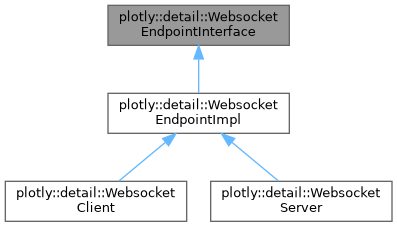
Public Types | |
| using | callback_t = std::function<void(const std::string_view &)> |
| Callback function type for handling incoming messages. | |
Public Member Functions | |
| WebsocketEndpointInterface () | |
| Default constructor. | |
| virtual | ~WebsocketEndpointInterface () |
| Virtual destructor. | |
| WebsocketEndpointInterface (const WebsocketEndpointInterface &)=delete | |
| Copy constructor (deleted) | |
| auto | operator= (const WebsocketEndpointInterface &) -> WebsocketEndpointInterface &=delete |
| Copy assignment operator (deleted) | |
| virtual auto | waitConnection (std::chrono::milliseconds timeout) const -> bool=0 |
| Wait for a connection to be established. | |
| virtual auto | isConnected () const -> bool=0 |
| Check if the endpoint is currently connected. | |
| virtual auto | send (const std::string_view &message) -> bool=0 |
| Send a message through the WebSocket connection. | |
| virtual void | registerCallback (const std::string_view &eventName, callback_t callback)=0 |
| Register a callback for a specific event. | |
| virtual void | unregisterCallback (const std::string_view &eventName)=0 |
| Unregister a callback for a specific event. | |
| virtual void | stop ()=0 |
| Stop the endpoint and clean up resources. | |
| virtual auto | getName () const -> std::string=0 |
| Get the name/identifier of this endpoint. | |
Detailed Description
Abstract interface for WebSocket endpoints.
This class defines the common interface for both client and server WebSocket endpoints. It provides methods for connection management, message sending, event callbacks, and lifecycle management.
The interface is designed to be thread-safe and supports asynchronous operation with callback-based event handling.
Member Typedef Documentation
◆ callback_t
| using plotly::detail::WebsocketEndpointInterface::callback_t = std::function<void(const std::string_view &)> |
Callback function type for handling incoming messages.
- Parameters
-
message The received message
Constructor & Destructor Documentation
◆ WebsocketEndpointInterface() [1/2]
|
default |
Default constructor.
◆ ~WebsocketEndpointInterface()
|
virtualdefault |
Virtual destructor.
◆ WebsocketEndpointInterface() [2/2]
|
delete |
Copy constructor (deleted)
Member Function Documentation
◆ getName()
|
nodiscardpure virtual |
Get the name/identifier of this endpoint.
- Returns
- A string identifying this endpoint
This method returns a human-readable name or identifier for the endpoint, useful for logging and debugging purposes.
Implemented in plotly::detail::WebsocketClient, and plotly::detail::WebsocketServer.
◆ isConnected()
|
nodiscardpure virtual |
Check if the endpoint is currently connected.
- Returns
- true if connected, false otherwise
This method provides a non-blocking way to check the current connection status of the endpoint.
Implemented in plotly::detail::WebsocketClient, and plotly::detail::WebsocketServer.
◆ operator=()
|
delete |
Copy assignment operator (deleted)
◆ registerCallback()
|
pure virtual |
Register a callback for a specific event.
- Parameters
-
eventName The name of the event to listen for callback The callback function to invoke when the event occurs
This method registers a callback function that will be called when a message with the specified event name is received. Only one callback can be registered per event name.
Implemented in plotly::detail::WebsocketEndpointImpl.
◆ send()
|
pure virtual |
Send a message through the WebSocket connection.
- Parameters
-
message The message to send
- Returns
- true if message was sent successfully, false otherwise
This method attempts to send a message through the WebSocket connection. The operation may fail if the connection is not established or if there are network issues.
Implemented in plotly::detail::WebsocketClient, and plotly::detail::WebsocketServer.
◆ stop()
|
pure virtual |
Stop the endpoint and clean up resources.
This method stops all endpoint operations, closes connections, and performs necessary cleanup. After calling this method, the endpoint should not be used for further operations.
Implemented in plotly::detail::WebsocketClient, and plotly::detail::WebsocketServer.
◆ unregisterCallback()
|
pure virtual |
Unregister a callback for a specific event.
- Parameters
-
eventName The name of the event to stop listening for
This method removes the callback associated with the specified event name. After calling this method, no callback will be invoked for the event.
Implemented in plotly::detail::WebsocketEndpointImpl.
◆ waitConnection()
|
nodiscardpure virtual |
Wait for a connection to be established.
- Parameters
-
timeout Maximum time to wait for connection
- Returns
- true if connection was established within timeout, false otherwise
This method blocks until either a connection is established or the timeout expires. It's useful for synchronizing with connection establishment in client scenarios or waiting for incoming connections in server scenarios.
Implemented in plotly::detail::WebsocketClient, and plotly::detail::WebsocketServer.
The documentation for this class was generated from the following files:
- src/detail/websockets_endpoint.hpp
- src/detail/websockets_endpoint.cpp
