Loading...
Searching...
No Matches
gallery_double_pendulum.cpp
Double Pendulum Simulation
This example demonstrates chaotic dynamics through real-time simulation of a double pendulum system, showcasing the complex, unpredictable motion that emerges from simple nonlinear differential equations and sensitive dependence on initial conditions.
Mathematical Framework
The double pendulum system is governed by the coupled nonlinear differential equations:
![\[\ddot{\theta_1} = \frac{-g(2m_1+m_2) \sin\theta_1 - m_2 g
\sin(\theta_1-2\theta_2) - 2 \sin(\theta_1-\theta_2) m_2 ( \omega_2^2 l_2 +
\omega_1^2 l_1 \cos(\theta_1-\theta_2) )}{l_1 ( 2m_1 + m_2 - m_2
\cos(2\theta_1-2\theta_2) )}
\]](form_0_dark.png)
![\[\ddot{\theta_2} = \frac{2 \sin(\theta_1-\theta_2) ( \omega_1^2 l_1 (m_1+m_2)
+ g (m_1+m_2) \cos\theta_1 + \omega_2^2 l_2 m_2 \cos(\theta_1-\theta_2)
)}{l_2 ( 2m_1 + m_2 - m_2 \cos(2\theta_1-2\theta_2) )}
\]](form_1_dark.png)
where:


The state vector is ![$[\theta_1, \theta_2, \omega_1, \omega_2]$](form_7_dark.png)


What You'll Learn
- Implementing physics simulations with coupled nonlinear differential equations
- Using 4th-order Runge-Kutta (RK4) integration for accurate numerical solutions
- Visualizing chaotic systems with real-time trajectory tracking and trail visualization
- Working with canonical equations of motion for double pendulum dynamics
- Creating smooth physics animations with proper time stepping and state management
- Understanding conservation of energy in Hamiltonian systems with small damping
- Managing complex state vectors and multi-body mechanical system visualization
Sample Output
The example creates a real-time physics simulation featuring:
- Two connected pendulum masses with realistic physics (lengths


- Gray connecting rods showing the physical linkage structure
- Red and blue markers representing the two pendulum masses
- Colored trails showing the historical motion paths of both masses
- Chaotic motion patterns that are highly sensitive to initial conditions
- Real-time updates at approximately 100 FPS for smooth animation
- Proper angle wrapping and energy-conserving integration


The system demonstrates classic chaotic behavior where small changes in initial conditions lead to dramatically different long-term evolution.
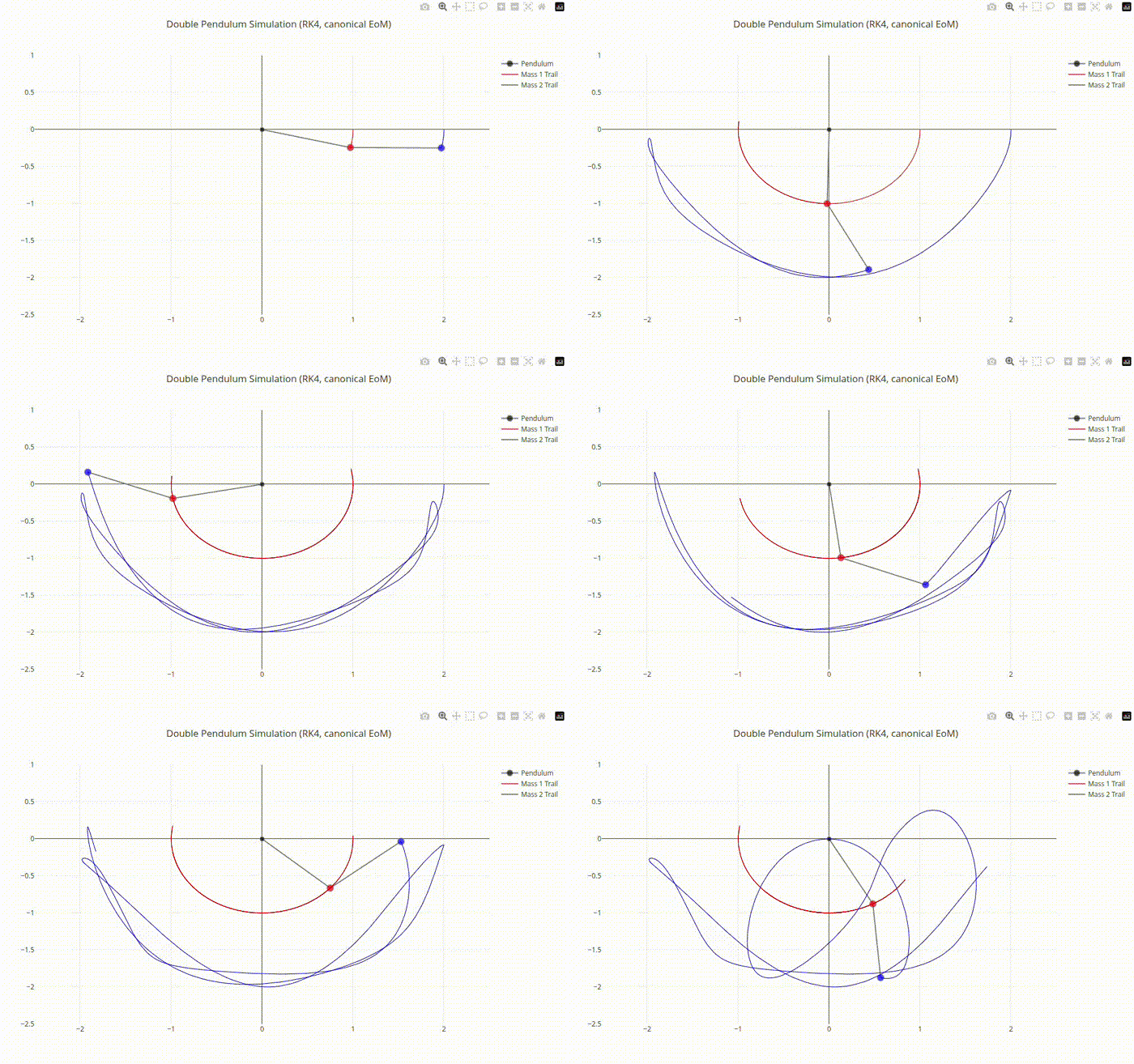
Double Pendulum Chaotic Motion Output
- See also
- plotly::Figure For the main plotting interface
- plotly::Figure::update() For real-time plot updates during simulation
#include "plotly/plotly.hpp"
#include <array>
#include <chrono>
#include <cmath>
#include <cstddef>
#include <thread>
#include <vector>
// State vector: [theta1, theta2, omega1, omega2]
// theta measured from vertical-down, x = l*sin(theta), y = -l*cos(theta)
};
// Normalize angle to (-pi, pi]
return std::remainder(x, 2.0 * M_PI);
}
// Canonical double-pendulum accelerations for absolute angles from vertical
-> std::array<double, 2> {
const double th1 = s[0], th2 = s[1];
const double w1 = s[2], w2 = s[3];
const double d = th1 - th2;
const double sd = std::sin(d);
const double cd = std::cos(d);
const double twoD = 2.0 * th1 - 2.0 * th2;
const double denom0 = (2.0 * p.m1 + p.m2) - p.m2 * std::cos(twoD);
const double den1 = p.l1 * denom0;
const double den2 = p.l2 * denom0;
const double num1 = -p.g * (2.0 * p.m1 + p.m2) * std::sin(th1) -
p.m2 * p.g * std::sin(th1 - 2.0 * th2) -
2.0 * sd * p.m2 * (w2 * w2 * p.l2 + w1 * w1 * p.l1 * cd);
const double num2 =
2.0 * sd *
(w1 * w1 * p.l1 * (p.m1 + p.m2) + p.g * (p.m1 + p.m2) * std::cos(th1) +
w2 * w2 * p.l2 * p.m2 * cd);
double a1 = num1 / den1;
double a2 = num2 / den2;
// Small viscous damping (optional)
a1 += -p.c1 * w1;
a2 += -p.c2 * w2;
return {a1, a2};
}
// Derivative function for RK4: f(t, y) -> dy/dt
const auto acc = accelerations(y, p);
return State{y[2], y[3], acc[0], acc[1]};
}
// Single RK4 step
const State k1 = dynamics(y, p);
State y2;
for (int i = 0; i < 4; ++i)
y2[i] = y[i] + 0.5 * dt * k1[i];
const State k2 = dynamics(y2, p);
State y3;
for (int i = 0; i < 4; ++i)
y3[i] = y[i] + 0.5 * dt * k2[i];
const State k3 = dynamics(y3, p);
State y4;
for (int i = 0; i < 4; ++i)
y4[i] = y[i] + dt * k3[i];
const State k4 = dynamics(y4, p);
for (int i = 0; i < 4; ++i) {
y[i] += (dt / 6.0) * (k1[i] + 2.0 * k2[i] + 2.0 * k3[i] + k4[i]);
}
// Keep angles wrapped
y[0] = wrapAngle(y[0]);
y[1] = wrapAngle(y[1]);
}
Params p;
// Integration settings
const double dt = 0.003; // integrator dt
const int substepsPerFrame = 3; // RK4 substeps per animation frame
// Initial conditions
State s{};
s[0] = M_PI / 2.0; // theta1
s[1] = M_PI / 2.0; // theta2
s[2] = 0.0; // omega1
s[3] = 0.0; // omega2
// Trails
std::vector<double> x1Trail, y1Trail;
std::vector<double> x2Trail, y2Trail;
const int maxTrailLength = 500;
// Plotly figure
plotly::Figure fig;
fig.openBrowser();
return std::array<double, 4>{x1, y1, x2, y2};
};
auto pos = computePositions(s);
// Initial plot
fig.newPlot(
{{{"x", {0.0, pos[0], pos[2]}},
{"y", {0.0, pos[1], pos[3]}},
{"mode", "lines+markers"},
{"type", "scatter"},
{"marker",
{{"size", {8, 12, 12}}, {"color", {"black", "red", "blue"}}}},
{"line", {{"color", "gray"}, {"width", 2}}},
{"name", "Pendulum"}},
{{"x", x1Trail},
{"y", y1Trail},
{"mode", "lines"},
{"type", "scatter"},
{"line", {{"color", "red"}, {"width", 1}}},
{"name", "Mass 1 Trail"}},
{{"x", x2Trail},
{"y", y2Trail},
{"mode", "lines"},
{"type", "scatter"},
{"line", {{"color", "blue"}, {"width", 1}}},
{"name", "Mass 2 Trail"}}},
{{"title", {{"text", "Double Pendulum Simulation (RK4, canonical EoM)"}}},
{"xaxis", {{"title", "x"}, {"range", {-2.5, 2.5}}}},
{"yaxis", {{"title", "y"}, {"range", {-2.5, 1.0}}}},
{"showlegend", true},
{"plot_bgcolor", "white"}});
// Animation loop
for (int i = 0; i < substepsPerFrame; ++i) {
rk4Step(s, dt, p);
}
pos = computePositions(s);
const double x1 = pos[0], y1 = pos[1], x2 = pos[2], y2 = pos[3];
x1Trail.push_back(x1);
y1Trail.push_back(y1);
x2Trail.push_back(x2);
y2Trail.push_back(y2);
auto trim = [&](std::vector<double> &vx, std::vector<double> &vy) -> void {
if (vx.size() > static_cast<size_t>(maxTrailLength)) {
vx.erase(vx.begin());
vy.erase(vy.begin());
}
};
trim(x1Trail, y1Trail);
trim(x2Trail, y2Trail);
{"y", {{0.0, y1, y2}, y1Trail, y2Trail}}});
std::this_thread::sleep_for(std::chrono::milliseconds(10));
}
return 0;
}
auto isOpen() const -> bool
Check whether the figure is currently open.
Definition plotly.cpp:404
auto update(const Object &traceUpdate, const Object &layoutUpdate=Object()) -> bool
Update an existing plot.
Definition plotly.cpp:417
auto newPlot(const Object &data, const Object &layout=Object(), const Object &config=Object()) -> bool
Create and render a new plot.
Definition plotly.cpp:408
auto openBrowser(bool headless=false) -> bool
Open the figure in the browser.
Definition plotly.cpp:529
Public Plotly C++ API header.
Definition gallery_double_pendulum.cpp:92
