Loading...
Searching...
No Matches
gallery_particle_physics_sim.cpp
This gallery example demonstrates an advanced real-time physics simulation using Plotly.cpp. It simulates charged particles with electromagnetic interactions, collision detection, and realistic physics behavior in a bounded environment.
Features demonstrated:
- Real-time particle physics simulation with Coulomb force calculations
- Dynamic scatter plot animation using plot updates
- Multi-threaded simulation loop with controlled frame rate
- Interactive visualization with hover information showing particle properties
- Particle size mapping to mass and color mapping to electric charge
- Boundary collision detection with energy damping
- Scientific color scale for charge visualization with colorbar
Physics concepts implemented:
- Coulomb's law for electromagnetic force calculation (F = k·q₁·q₂/r²)
- Newton's laws of motion for particle dynamics (F = ma)
- Energy damping for realistic particle behavior
- Elastic collision with boundary walls
- Multi-particle interaction system with N-body calculations
The simulation creates a visually engaging demonstration of electrodynamics with particles that attract/repel based on their charges and exhibit realistic motion patterns within a confined space.
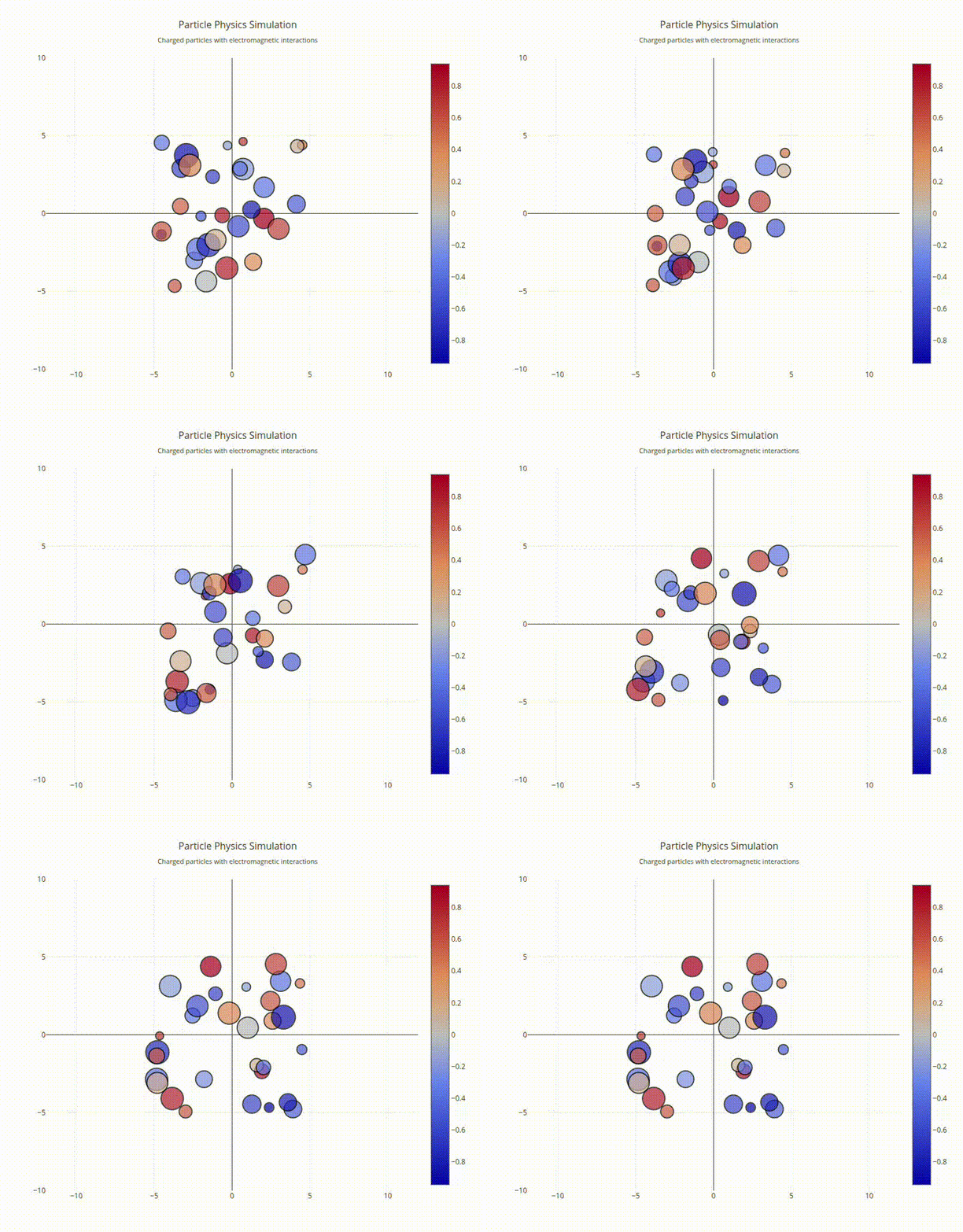
Interactive Particle Physics
Simulation"
#include "plotly/plotly.hpp"
#include <algorithm>
#include <chrono>
#include <cmath>
#include <iostream>
#include <random>
#include <string>
#include <thread>
#include <vector>
std::string color;
};
std::cout << "Starting particle physics simulation..." << '\n';
plotly::Figure fig;
fig.openBrowser();
// Simulation parameters
const int numParticles = 30;
const double dt = 0.02;
const double boxSize = 10.0;
const double dampening = 0.999;
const int animationFrames = 200;
const int frameDelay = 50; // milliseconds
// Initialize random particles
std::random_device rd;
std::mt19937 gen(rd());
std::uniform_real_distribution<double> posDist(-boxSize / 2, boxSize / 2);
std::uniform_real_distribution<double> velDist(-2.0, 2.0);
std::uniform_real_distribution<double> massDist(0.5, 2.0);
std::uniform_real_distribution<double> chargeDist(-1.0, 1.0);
std::vector<std::string> colors = {"red", "blue", "green", "orange",
"purple", "cyan", "magenta", "yellow",
"brown", "pink"};
std::vector<Particle> particles(numParticles);
for (int i = 0; i < numParticles; i++) {
particles[i] = {
.x = posDist(gen),
.y = posDist(gen), // position
.vx = velDist(gen),
.vy = velDist(gen), // velocity
.mass = massDist(gen), // mass
.charge = chargeDist(gen), // charge
.color = colors[i % colors.size()] // color
};
}
// Create initial particle positions
std::vector<double> xPos, yPos, sizes, charges;
std::vector<std::string> particleColors;
for (const auto &p : particles) {
xPos.push_back(p.x);
yPos.push_back(p.y);
sizes.push_back(p.mass * 20); // Scale size by mass
charges.push_back(p.charge);
particleColors.push_back(p.color);
}
// Create initial trace
plotly::Object trace = {
{"type", "scatter"},
{"mode", "markers"},
{"x", xPos},
{"y", yPos},
{"marker",
{{"size", sizes},
{"color", charges},
{"colorscale", "RdBu"},
{"showscale", true},
{"colorbar", {{"title", "Electric Charge"}, {"titleside", "right"}}},
{"line", {{"width", 2}, {"color", "black"}}}}},
{"name", "Particles"},
{"hovertemplate", "Position: (%{x:.2f}, %{y:.2f})<br>" +
std::string("Charge: %{marker.color:.2f}<br>") +
"Mass: %{marker.size:.0f}<extra></extra>"}};
// Create layout
plotly::Object layout = {
{"title",
{{"text", "Particle Physics Simulation<br>" +
std::string("<sub>Charged particles with electromagnetic "
"interactions</sub>")},
{"font", {{"size", 16}}}}},
{"xaxis",
{{"title", "X Position"},
{"range", {-boxSize, boxSize}},
{"showgrid", true},
{"zeroline", true}}},
{"yaxis",
{{"title", "Y Position"},
{"range", {-boxSize, boxSize}},
{"showgrid", true},
{"zeroline", true},
{"scaleanchor", "x"}}},
{"width", 800},
{"height", 700},
{"showlegend", false}};
// Create initial plot
std::vector<plotly::Object> data = {trace};
fig.newPlot(data, layout);
std::cout << "Starting animation with " << numParticles << " particles..."
<< '\n';
// Physics simulation loop
// Calculate forces and update particles
for (int i = 0; i < numParticles; i++) {
double fx = 0.0, fy = 0.0;
// Calculate electromagnetic forces from other particles
for (int j = 0; j < numParticles; j++) {
if (i == j)
continue;
double dx = particles[j].x - particles[i].x;
double dy = particles[j].y - particles[i].y;
double r2 = dx * dx + dy * dy;
double r = std::sqrt(r2);
if (r > 0.1) { // Avoid division by zero
// Coulomb force: F = k * q1 * q2 / r^2
double forceMagnitude =
particles[i].charge * particles[j].charge / r2;
fx -= forceMagnitude * dx / r; // Repulsive if same charge
fy -= forceMagnitude * dy / r;
}
}
// Update velocity with force (F = ma, so a = F/m)
particles[i].vx += fx / particles[i].mass * dt;
particles[i].vy += fy / particles[i].mass * dt;
// Apply dampening
particles[i].vx *= dampening;
particles[i].vy *= dampening;
// Update position
particles[i].x += particles[i].vx * dt;
particles[i].y += particles[i].vy * dt;
// Bounce off walls
if (particles[i].x < -boxSize / 2 || particles[i].x > boxSize / 2) {
particles[i].vx *= -0.8;
particles[i].x =
std::max(-boxSize / 2, std::min(boxSize / 2, particles[i].x));
}
if (particles[i].y < -boxSize / 2 || particles[i].y > boxSize / 2) {
particles[i].vy *= -0.8;
particles[i].y =
std::max(-boxSize / 2, std::min(boxSize / 2, particles[i].y));
}
}
// Update plot data
xPos.clear();
yPos.clear();
for (const auto &p : particles) {
xPos.push_back(p.x);
yPos.push_back(p.y);
}
// Update the plot
std::this_thread::sleep_for(std::chrono::milliseconds(frameDelay));
if (frame % 50 == 0) {
std::cout << "Frame " << frame << "/" << animationFrames << '\n';
}
}
std::cout << "Simulation completed. Close browser to exit." << '\n';
fig.waitClose();
return 0;
}
auto restyle(const Object &aobj, const Object &traces=Object()) -> bool
Restyle existing traces.
Definition plotly.cpp:430
void waitClose() const
Wait until the figure is closed (no client connected).
Definition plotly.cpp:406
auto isOpen() const -> bool
Check whether the figure is currently open.
Definition plotly.cpp:404
auto newPlot(const Object &data, const Object &layout=Object(), const Object &config=Object()) -> bool
Create and render a new plot.
Definition plotly.cpp:408
auto openBrowser(bool headless=false) -> bool
Open the figure in the browser.
Definition plotly.cpp:529
Public Plotly C++ API header.
Definition gallery_particle_physics_sim.cpp:50
