Loading...
Searching...
No Matches
gallery_event_handling.cpp
Interactive Event Handling Example
This example demonstrates how to handle user interactions with plots using Plotly.js event callbacks. The program responds to mouse hover and click events on plot elements in real-time.
What You'll Learn
- Event-driven programming with interactive plots
- Handling plotly_hover and plotly_click events
- Dynamic plot annotation based on user interactions
- Bidirectional communication between C++ backend and browser
- Real-time plot updates using relayout() function
Sample Output
The example creates an interactive scatter plot where:
- Hovering over points displays "hover" annotation at the point location
- Clicking on points displays "click" annotation and prints coordinates to console
- Both interactions dynamically update the plot with blue text annotations
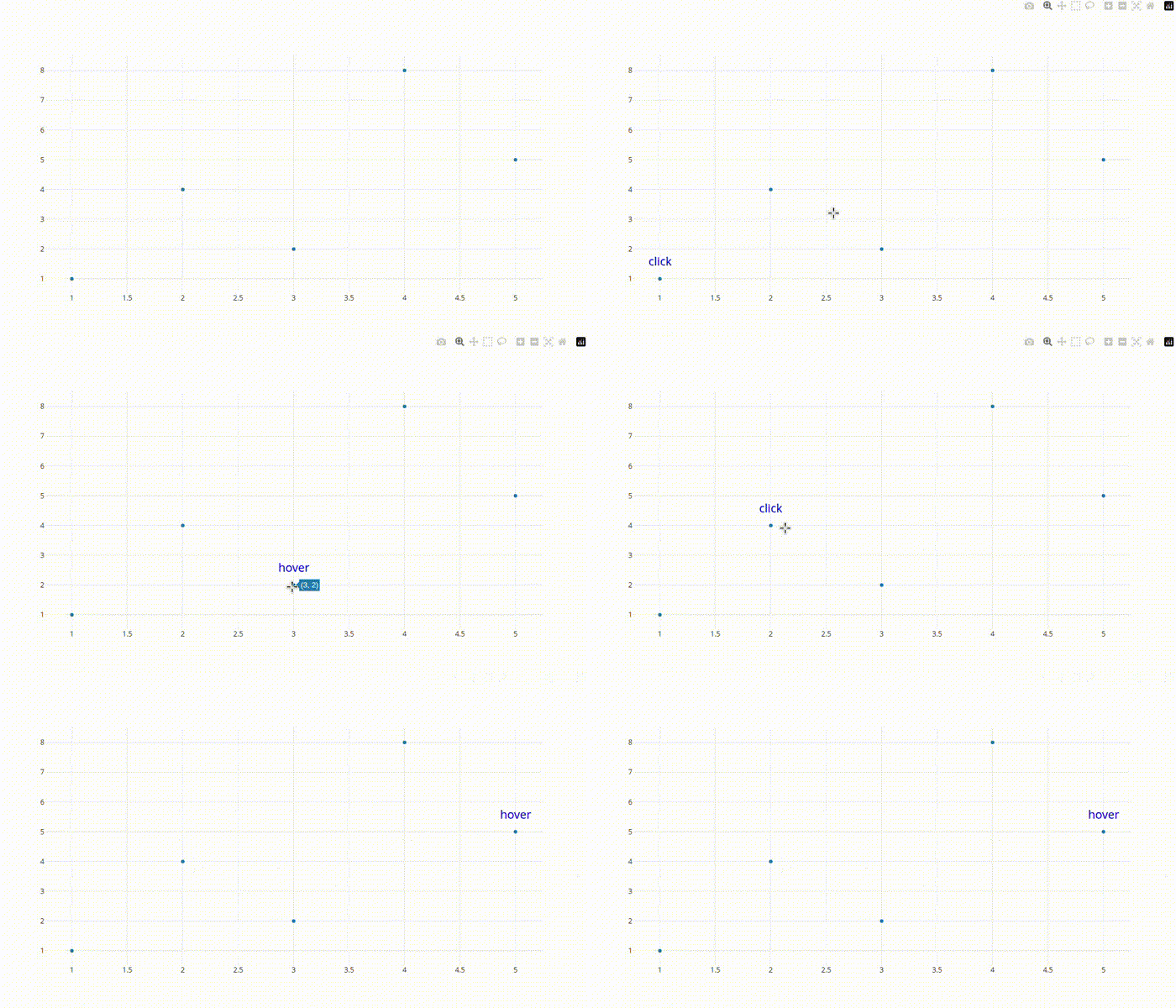
Interactive Event Handling Example
- See also
- plotly::Figure::on() For event callback registration
- plotly::Figure::relayout() For dynamic layout updates
#include "plotly/plotly.hpp"
#include <iostream>
#include <vector>
plotly::Figure fig;
fig.openBrowser();
// Create plot
std::vector<double> x = {1, 2, 3, 4, 5};
std::vector<double> y = {1, 4, 2, 8, 5};
plotly::Object trace = {
{"x", x}, {"y", y}, {"type", "scatter"}, {"mode", "markers"}};
// Register hover event handler
std::cout << "Hovering over point" << '\n';
// Get point information
auto xValue = event["points"][0]["x"];
auto yValue = event["points"][0]["y"];
// Add annotation with "hover" text
plotly::Object annotation = {
{"x", xValue},
{"y", yValue},
{"text", "hover"},
{"showarrow", false},
{"yshift", 30},
fig.relayout(layoutUpdate);
});
// Register click event handler
std::cout << "Point clicked: x=" << event["points"][0]["x"]
<< ", y=" << event["points"][0]["y"] << '\n';
// Get point information
auto xValue = event["points"][0]["x"];
auto yValue = event["points"][0]["y"];
// Add annotation with "click" text
plotly::Object annotation = {
{"x", xValue},
{"y", yValue},
{"text", "click"},
{"showarrow", false},
{"yshift", 30},
fig.relayout(layoutUpdate);
});
fig.waitClose();
return 0;
}
void waitClose() const
Wait until the figure is closed (no client connected).
Definition plotly.cpp:406
auto relayout(const Object &layout=Object()) -> bool
Apply layout-only changes to the plot.
Definition plotly.cpp:422
auto on(const std::string &event, const std::function< void(plotly::Object)> &callback) -> bool
Register a listener for a Plotly event.
Definition plotly.cpp:475
auto newPlot(const Object &data, const Object &layout=Object(), const Object &config=Object()) -> bool
Create and render a new plot.
Definition plotly.cpp:408
auto openBrowser(bool headless=false) -> bool
Open the figure in the browser.
Definition plotly.cpp:529
Public Plotly C++ API header.
