Loading...
Searching...
No Matches
gallery_clustering_animation.cpp
K-means Clustering Animation
This example demonstrates the K-means clustering algorithm through real-time animation, visualizing how the algorithm iteratively converges to optimal cluster assignments by alternating between assignment and centroid update steps.
What You'll Learn
- Implementing the complete K-means clustering algorithm with iterative convergence
- Creating real-time animations that update plot elements dynamically during computation
- Visualizing machine learning algorithm convergence through interactive plots
- Managing multiple data traces (points and centroids) with different visual properties
- Using color coding to represent cluster assignments and algorithm state
- Applying mathematical distance calculations (Euclidean) for cluster assignment
- Implementing convergence detection and algorithm termination conditions
Sample Output
The example creates an animated visualization of K-means clustering with:
- 200 synthetic data points distributed across 4 natural clusters
- 4 cluster centroids (marked with X symbols) that move during optimization
- Real-time color updates showing point-to-cluster assignments
- Convergence detection that stops animation when algorithm reaches optimum
- Final visualization highlighting the discovered cluster structure
The algorithm demonstrates the two-step process:
- Assignment step: Points change color based on nearest centroid
- Update step: Centroids move to cluster centers
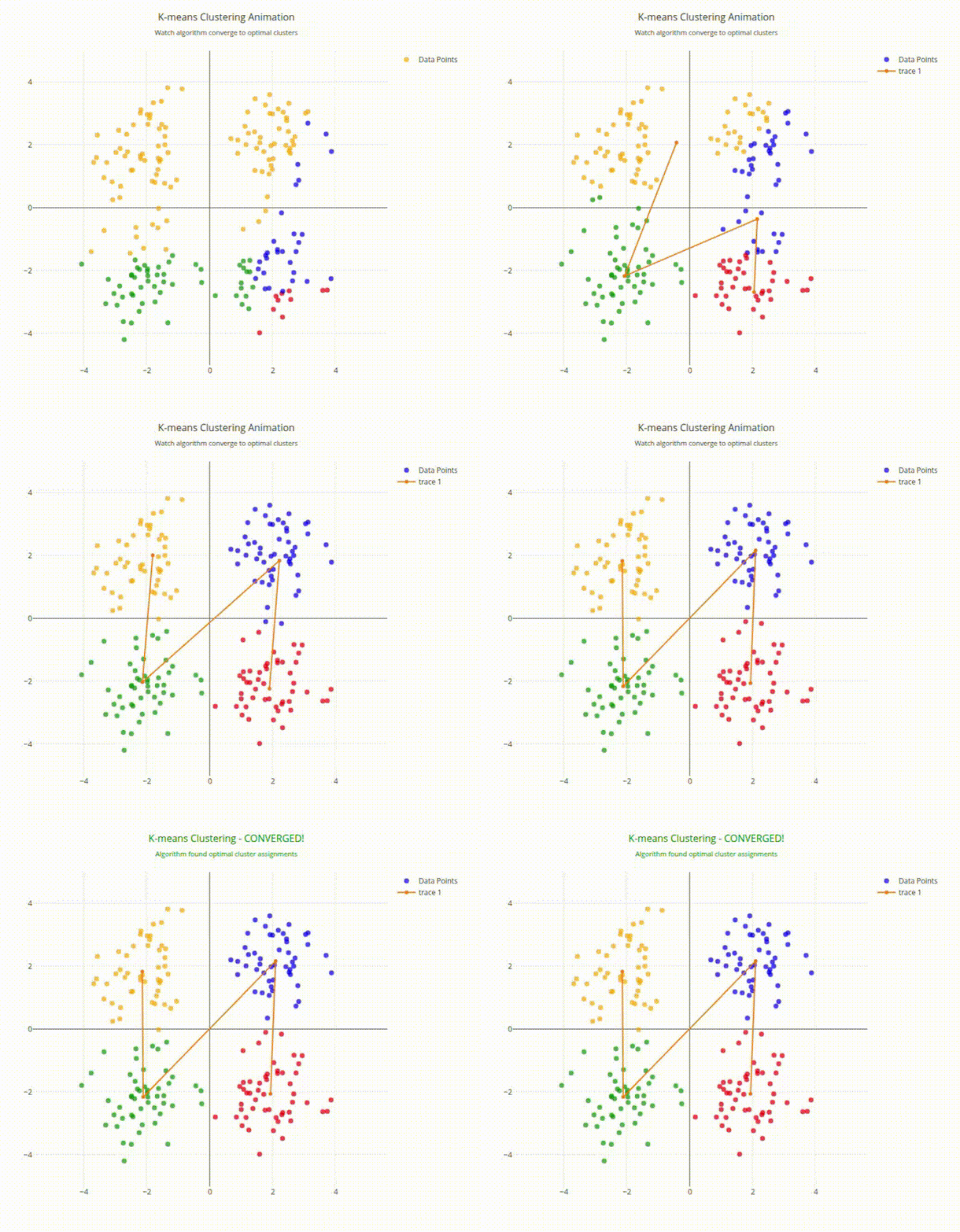
K-means Clustering Animation Output
- See also
- plotly::Figure For the main plotting interface
- plotly::Figure::restyle() For updating plot properties during animation
#include "plotly/plotly.hpp"
#include <chrono>
#include <cmath>
#include <iostream>
#include <limits>
#include <random>
#include <string>
#include <thread>
#include <utility>
#include <vector>
std::string color;
};
std::string color;
};
// Calculate Euclidean distance
return std::sqrt((p.x - c.x) * (p.x - c.x) + (p.y - c.y) * (p.y - c.y));
}
std::cout << "Starting K-means clustering animation..." << '\n';
plotly::Figure fig;
fig.openBrowser();
// Clustering parameters
const int numPoints = 200;
const int k = 4; // Number of clusters
const int maxIterations = 20;
std::vector<std::string> clusterColors = {"red", "blue", "green", "orange"};
// Generate synthetic data with natural clusters
std::random_device rd;
std::mt19937 gen(rd());
std::vector<Point> points;
points.reserve(numPoints);
// Create 4 natural clusters
std::vector<std::pair<double, double>> clusterCenters = {
{2.0, 2.0}, {-2.0, 2.0}, {-2.0, -2.0}, {2.0, -2.0}};
for (int cluster = 0; cluster < 4; cluster++) {
std::normal_distribution<double> xDist(clusterCenters[cluster].first, 0.8);
std::normal_distribution<double> yDist(clusterCenters[cluster].second, 0.8);
for (int i = 0; i < numPoints / 4; i++) {
points.push_back({xDist(gen), yDist(gen),
-1, // Initially unassigned
"gray"});
}
}
// Initialize centroids randomly
std::uniform_real_distribution<double> coordDist(-4.0, 4.0);
std::vector<Centroid> centroids(k);
for (int i = 0; i < k; i++) {
centroids[i] = {
.x = coordDist(gen), .y = coordDist(gen), .color = clusterColors[i]};
}
// Create initial plot data
std::vector<double> xCoords, yCoords;
std::vector<std::string> pointColors;
for (const auto &p : points) {
xCoords.push_back(p.x);
yCoords.push_back(p.y);
pointColors.emplace_back("gray");
}
std::vector<double> centroidX, centroidY;
std::vector<std::string> centroidColors;
for (const auto &c : centroids) {
centroidX.push_back(c.x);
centroidY.push_back(c.y);
centroidColors.push_back(c.color);
}
// Create traces
plotly::Object pointTrace = {
{"type", "scatter"},
{"mode", "markers"},
{"x", xCoords},
{"y", yCoords},
{"marker", {{"color", pointColors}, {"size", 8}, {"opacity", 0.7}}},
{"name", "Data Points"},
{"hovertemplate", "Point (%{x:.2f}, %{y:.2f})<extra></extra>"}};
plotly::Object centroidTrace = {
{"type", "scatter"},
{"mode", "markers"},
{"x", centroidX},
{"y", centroidY},
{"marker",
{{"color", centroidColors},
{"size", 20},
{"symbol", "x"},
{"line", {{"width", 3}, {"color", "black"}}}},
{"name", "Centroids"},
{"hovertemplate", "Centroid (%{x:.2f}, %{y:.2f})<extra></extra>"}}};
// Create layout
plotly::Object layout = {
{"title",
{{"text",
"K-means Clustering Animation<br>" +
std::string(
"<sub>Watch algorithm converge to optimal clusters</sub>")},
{"font", {{"size", 16}}}}},
{"xaxis",
{{"title", "X Coordinate"}, {"range", {-5, 5}}, {"showgrid", true}}},
{"yaxis",
{{"title", "Y Coordinate"},
{"range", {-5, 5}},
{"showgrid", true},
{"scaleanchor", "x"}}},
{"width", 800},
{"height", 700},
{"showlegend", true}};
// Create initial plot
std::vector<plotly::Object> data = {pointTrace, centroidTrace};
fig.newPlot(data, layout);
std::cout << "Starting K-means algorithm with " << k << " clusters..."
<< '\n';
// K-means algorithm with animation
for (int iteration = 0; iteration < maxIterations; iteration++) {
std::cout << "Iteration " << (iteration + 1) << "/" << maxIterations
<< '\n';
bool converged = true;
// Assignment step: assign each point to nearest centroid
for (auto &point : points) {
double minDist = std::numeric_limits<double>::max();
int bestCluster = 0;
for (int j = 0; j < k; j++) {
double dist = distance(point, centroids[j]);
if (dist < minDist) {
minDist = dist;
bestCluster = j;
}
}
if (point.cluster != bestCluster) {
converged = false;
point.cluster = bestCluster;
point.color = clusterColors[bestCluster];
}
}
// Update point colors
pointColors.clear();
for (const auto &p : points) {
pointColors.push_back(p.color);
}
// Update plot with new point assignments
std::this_thread::sleep_for(std::chrono::milliseconds(800));
// Update step: move centroids to cluster centers
std::vector<double> newCentroidX(k, 0.0), newCentroidY(k, 0.0);
std::vector<int> clusterCounts(k, 0);
for (const auto &point : points) {
if (point.cluster >= 0) {
newCentroidX[point.cluster] += point.x;
newCentroidY[point.cluster] += point.y;
clusterCounts[point.cluster]++;
}
}
// Calculate new centroid positions
for (int j = 0; j < k; j++) {
if (clusterCounts[j] > 0) {
double newX = newCentroidX[j] / clusterCounts[j];
double newY = newCentroidY[j] / clusterCounts[j];
if (std::abs(centroids[j].x - newX) > 0.01 ||
std::abs(centroids[j].y - newY) > 0.01) {
converged = false;
}
centroids[j].x = newX;
centroids[j].y = newY;
}
}
// Update centroid positions
centroidX.clear();
centroidY.clear();
for (const auto &c : centroids) {
centroidX.push_back(c.x);
centroidY.push_back(c.y);
}
std::this_thread::sleep_for(std::chrono::milliseconds(800));
if (converged) {
std::cout << "Algorithm converged after " << (iteration + 1)
<< " iterations!" << '\n';
break;
}
}
// Update title to show completion
fig.relayout(
{{"title",
{{"text",
"K-means Clustering - CONVERGED!<br>" +
std::string(
"<sub>Algorithm found optimal cluster assignments</sub>")},
{"font", {{"size", 16}, {"color", "green"}}}}}});
std::cout << "Clustering animation completed. Close browser to exit." << '\n';
fig.waitClose();
return 0;
}
auto restyle(const Object &aobj, const Object &traces=Object()) -> bool
Restyle existing traces.
Definition plotly.cpp:430
void waitClose() const
Wait until the figure is closed (no client connected).
Definition plotly.cpp:406
auto relayout(const Object &layout=Object()) -> bool
Apply layout-only changes to the plot.
Definition plotly.cpp:422
auto newPlot(const Object &data, const Object &layout=Object(), const Object &config=Object()) -> bool
Create and render a new plot.
Definition plotly.cpp:408
auto openBrowser(bool headless=false) -> bool
Open the figure in the browser.
Definition plotly.cpp:529
auto distance(const Point &p, const Centroid &c) -> double
Definition gallery_clustering_animation.cpp:72
Public Plotly C++ API header.
Definition gallery_clustering_animation.cpp:66
Definition gallery_clustering_animation.cpp:60
