System Architecture
Plotly.cpp implements a client-server architecture that bridges C++ applications with web-based visualization capabilities through Plotly.js. The system enables real-time, bidirectional communication between C++ code and a JavaScript frontend running in a web browser.
Core Architecture Components
The architecture consists of three main layers:
- C++ Backend Layer - The core library providing the plotly::Figure API
- Communication Layer - WebSocket and HTTP servers enabling real-time data exchange
- JavaScript Frontend Layer - Browser-based visualization using Plotly.js

Communication Protocol
JSON-RPC 2.0 Over WebSocket
The system uses JSON-RPC 2.0 as the primary communication protocol, transmitted over WebSocket connections. This provides:
- Structured messaging with request/response semantics
- Bidirectional communication (C++ ↔ JavaScript)
- Error handling with standardized error codes
- Real-time updates with low latency
C++ to JavaScript Communication Flow
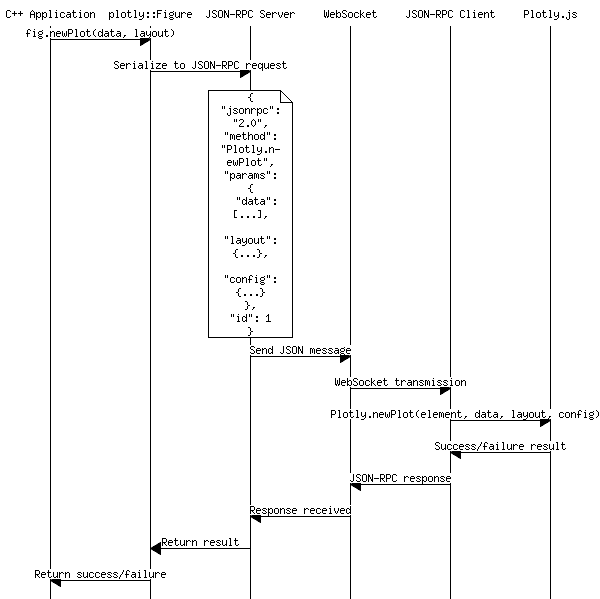
JavaScript to C++ Communication Flow

HTTP Server for Static Assets
An HTTP server serves the JavaScript frontend:
- Single-page application with bundled Plotly.js
- WebSocket endpoint discovery via /ws_port endpoint
- Static file serving for HTML, CSS, and JavaScript assets
- Automatic port allocation to avoid conflicts
Implementation Details
C++ Backend Components
plotly::Figure
It is implemented in plotly::Figure class in src/plotly.cpp. The main user-facing API that encapsulates:
- PIMPL idiom for ABI stability
- WebSocket server management
- HTTP server management
- Browser process control
- JSON-RPC client functionality
Key implementation files:
- include/plotly/plotly.hpp - Public API interface
- src/plotly.cpp - Main implementation
- src/detail/websockets_server.cpp - WebSocket server using websocketpp
- src/detail/http_server.cpp - HTTP server using httplib
- src/detail/json_rpc.cpp - JSON-RPC protocol implementation
WebSocket Server
It is implemented in plotly::detail::WebsocketServer class in src/detail/websockets_server.cpp. Built on websocketpp library with the following implementation:
Threading Architecture:
- Service Thread: Runs the Boost.Asio event loop (_server.run()) handling WebSocket I/O operations
- Callback Executor Thread: Processes incoming messages and dispatches to registered callbacks (inherited from WebsocketEndpointImpl)
Connection Management:
- Multiple Client Support: Maintains active connections using std::set<connection_hdl> with WebSocket connection handles
- Dynamic Client Tracking: Connections automatically added/removed via websocketpp handlers (set_open_handler/set_close_handler)
- Client Lifecycle Synchronization: Provides waitConnection() and waitUntilNoClient() for coordinating with client connection states
Network Configuration:
- Dynamic Port Allocation: Uses promise/future pattern to communicate the actual bound port after server initialization
- TCP Optimization: Disables Nagle algorithm for low-latency JSON-RPC communication
- Flexible Address Binding: Supports both specific address binding and wildcard binding
- Socket Reuse: Enables address reuse to prevent binding conflicts on restart
Message Broadcasting:
- All-Client Broadcasting: send() method delivers messages to all connected clients simultaneously
- Resilient Delivery: Individual client send failures don't prevent delivery to other clients
- Text Frame Protocol: Uses WebSocket text frames for JSON-RPC message transmission
HTTP Server
It is implemented in plotly::detail::HttpServer class in src/detail/http_server.cpp. Built on httplib library with the following implementation:
Dual Construction Modes:
- Directory Serving Mode: Uses set_mount_point("/", directory) to serve static files from filesystem
- Content Serving Mode: Registers a single GET handler for "/" to serve HTML content directly from memory
Port Management:
- Dynamic Port Binding: Uses bind_to_any_port("0.0.0.0") to automatically allocate available ports
- Port Discovery: Returns allocated port via getPort() for external components to connect
- All-Interface Binding: Listens on "0.0.0.0" to accept connections from any network interface
WebSocket Integration:
- Port Discovery Endpoint: /ws_port endpoint returns JSON with WebSocket server port for client connection
- Page Load Confirmation: /loaded endpoint allows frontend to signal successful initialization
- Connection Management: Uses setWebsocketPortRequestHandler() to configure WebSocket port response
Threading Model:
- Background Operation: Server runs in dedicated thread (_serverThread) using listen_after_bind()
- Startup Synchronization: Busy-waits using is_running() check to confirm server initialization
- HTTP Keep-Alive: Configured with set_keep_alive_max_count(1) to limit persistent connections
JSON-RPC Server
It is implemented in plotly::detail::JsonRpc class in src/detail/json_rpc.cpp. Built as a complete JSON-RPC 2.0 implementation with the following architecture:
Protocol Compliance:
- JSON-RPC 2.0 Standard: Full compliance with specification including request/response/notification formats
- Standard Error Codes: Implements predefined error codes (PARSE_ERROR, INVALID_REQUEST, METHOD_NOT_FOUND, etc.)
- Message Validation: Validates required fields (jsonrpc, method) and handles malformed requests
Method Dispatch System:
- Handler Registration: Stores method handlers in std::unordered_map<std::string, std::function<json(json)>>
- Notification Handlers: Separate handler map for notifications (no response required)
- Request Processing: Parses incoming messages, validates format, and routes to appropriate handlers
- Exception Handling: Catches handler exceptions and converts to JSON-RPC error responses
Asynchronous Call Management:
- Future-Based API: call() method returns std::future<nlohmann::json> for asynchronous result handling
- Request ID Correlation: Auto-incrementing request IDs to match responses with requests
- Unique Callback Names: Uses UUID-generated callback names to handle concurrent requests
- Call Cancellation: Provides cancellation function to abort pending requests
WebSocket Integration:
- Endpoint Abstraction: Takes WebsocketEndpointInterface for transport layer independence
- Callback Management: Tracks registered WebSocket callbacks for proper cleanup
- Message Routing: Routes all incoming WebSocket messages through JSON-RPC protocol handler
Response Generation:
- Success Responses: Automatically formats results into JSON-RPC response objects
- Error Responses: Generates compliant error responses with code, message, and optional data
- Notification Handling: Processes notifications without generating responses
Key Design Patterns
API Mirroring
Every Plotly.js method has a corresponding C++ method with identical semantics:

Event-Driven Architecture
Bidirectional events enable interactivity:

Browser Integration
Automatic browser management simplifies deployment:
- Process spawning with configurable Chrome/Chromium paths
- Headless mode support for server environments
- Download directory configuration via Chrome DevTools Protocol
- Shutdown with proper process cleanup
